
Note: Depending on your access rights to OrangeCRM, some of the options and views listed below may vary. See Security and Access and Revisions.
The Lead Commission links commissions to an Acquisition Center based on the leads that they send to the CRM. By creating a lead commission, you will enable a Commission Payee to be able to collect commissions from leads acquired from an Acquisition Center.
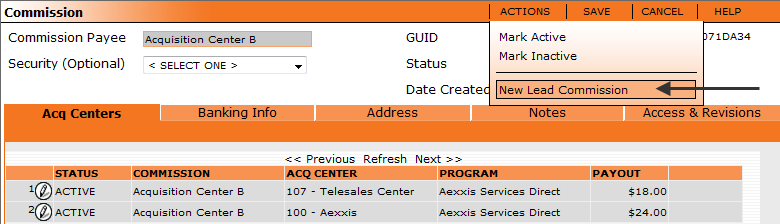
To create a Lead Commission, you can either select New Lead Commission from the action menu on Commissions (located on the main navigation menu under Lists):
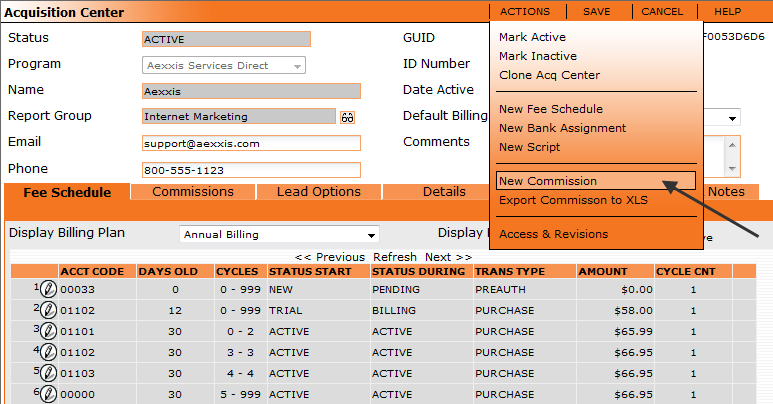
Or you can select New Commission from the Acquisition Center action menu (located on the main navigation menu under Lists: Acquisition Centers):
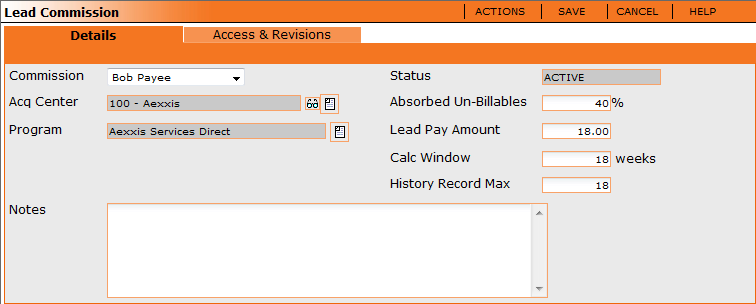
An example of a Lead Commission is seen below.
Details Tab
The Details tab will show you the details for this commission structure. It shows the Commission payee, the Acquisition Center, and which program the lead commission is under.
Status - The status of the lead commission, either active or inactive. An inactive Lead Commission will not be calculated.
Absorbed Un-Billables - Unbillables are the amount of bad leads that you will absorb into your own costs before you begin to charge them back to the originating Acquisition Center. This amount will be determined by your Acquisition Center's contract.
Lead Pay Amount - The dollar amount that you pay for a lead.
Calc Window - Duration in number of weeks that the summary process counts backwards in time to determine if a lead was "good". This number is often determined by the contract with your acquisition center.
History Record Max - The number of records that are retained. (i.e. the number of snapshots stored). This number should not be higher then the calc window.
Access and Revisions
The access and revisions tab shows any change that has been made to this record. It also shows who has access to view this record. See Access and Revisions.